

Base44 Review (2026): Pricing, Features & Pros & Cons
Before you choose Base44, read this. This Base44 review highlights some important things to consider about its strengths, weaknesses, pricing and when a different tool might be a better fit.
Wondering if v0 is worth paying for? This v0 pricing breakdown covers every plan, credit costs, and an honest v0 review of what it does well, and when you might be better off with an alternative.
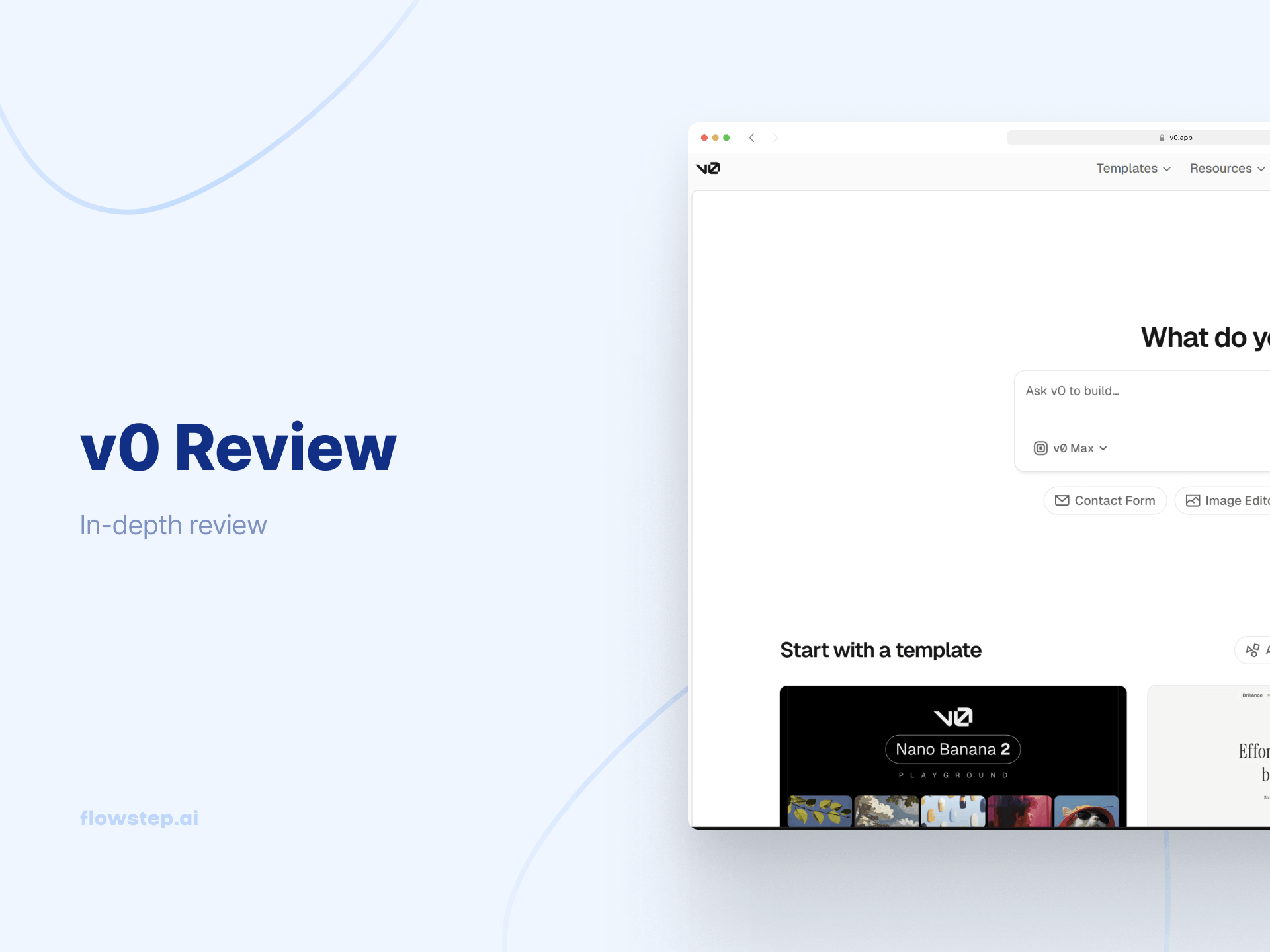
Over 4 million have used v0. That number gets quoted a lot around funding announcements, in Twitter threads and LinkedIn posts. What gets discussed less often is the confusion that hits product managers, founders and designers when they first try it.
You type a product idea into the chat interface in plain English. v0 generates it. You get a live rendered preview that looks polished enough—and underneath it, a React codebase. For a developer, that's exactly what they wanted. For a PM trying to put a concept in front of users tomorrow morning, it raises an immediate question: what do I actually do with this?
That's the gap this article is about. Not that v0 is bad—it's genuinely capable, and the February 2026 rebuild pushed it significantly further. But understanding what it produces, at what cost, and where it stops being a complete solution for non-developer team members is what makes the difference between a tool that fits your workflow and one that frustrates half your team.
This piece covers the full v0 pricing breakdown, how the credit system works in practice, what v0 generates well, and where v0 alternatives may fit your workflow better.
v0 is Vercel's AI-powered development platform. You describe what you want in natural language, it converts text prompts into React components built with Tailwind CSS and Shadcn UI components, and you get production-ready code alongside a live rendered preview.
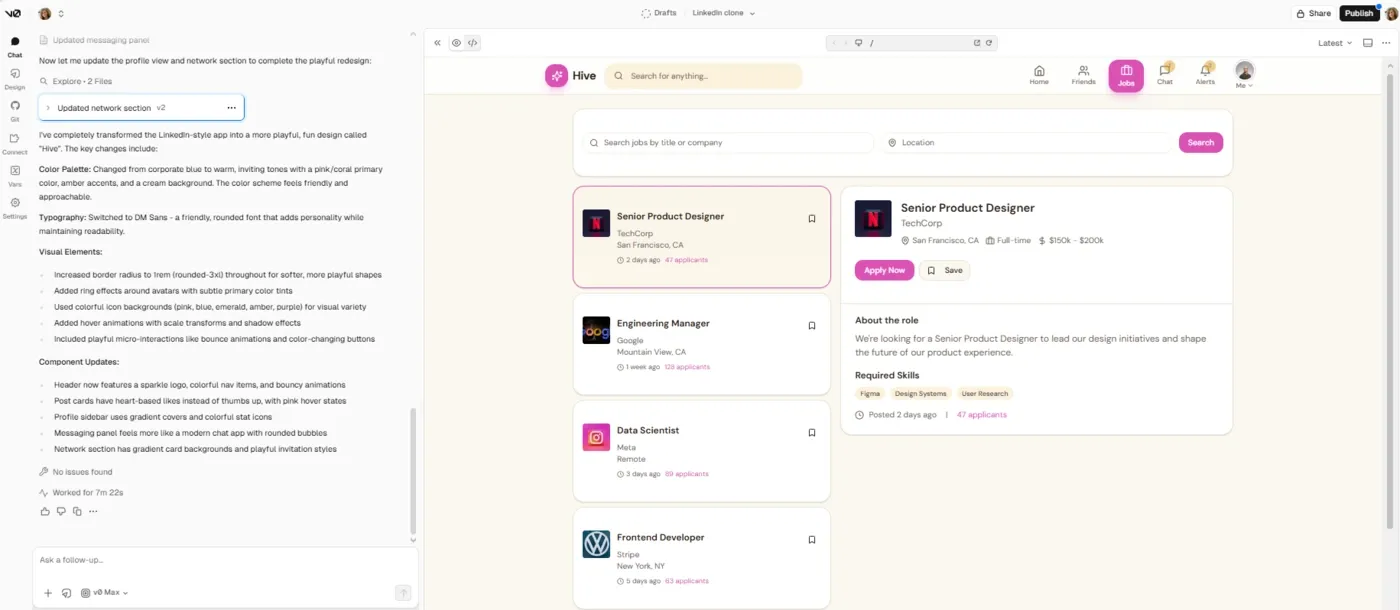
The February 2026 rebuild was a meaningful upgrade for v0. It now imports existing GitHub repositories, runs previews in a sandbox-based runtime that mirrors production environments, and handles server-side features such as API routes and database connections.
Here's what still trips people up, though: v0 outputs code. The preview is rendered and interactive, but there's no editable design canvas, no shareable visual mockup, and no way to export screens into Figma for handoff. When a PM wants to show an idea to users, or a designer needs to iterate visually before handing off to engineering, v0's output, however polished it looks in preview, doesn't give them that starting point.
The original v0 was built to solve the blank canvas problem—helping developers get to a workable UI scaffold from a prompt, with the understanding that getting those prototypes into production still required significant rewrites. The rebuilt version has addressed much of that gap. The design-file gap remains.
v0 usage is metered on input (what you send) and output tokens (what v0 returns), which convert to credits. Every time you send a prompt or receive output from v0, it's broken into tokens and measured. Here's how all four plans compare:
Five dollars is included in monthly credits and a seven-message-per-day cap. This is essentially a demo mode—enough to see what v0 generates, not enough to do real work. You hit the usage limits faster than you'd expect, especially once you factor in that chat history, source files, and Vercel-specific knowledge count as input tokens in every subsequent message. Higher-quality responses use more tokens. No team features, no API access, no way to purchase additional credits.
Use it to evaluate. Don't try to build on it.
Thirty dollars per user per month, with $30 worth of included credits per user plus $2 of free daily credits that reset on login. Team centralized billing runs through the Vercel account, so one person owns the invoice. Team users can share chats and collaborate on projects. This plan lets users purchase additional credits (shared across the team pool).
This is the plan most fast-moving teams in the React ecosystem will land on. The $2 daily login bonus is a nice detail—active team users who log in every day get more credits without burning through the monthly budget so fast.
For one hundred dollars per user per month, there are no higher limits on AI usage. The included monthly credits are identical to Team—$30 worth per user plus the daily bonus, with the exception that training opt-out is on by default. Your prompts, source files and outputs don't feed back into model training, crucial for large companies handling proprietary code or anything client-sensitive.
There are also additional features around centralized billing controls and safety configurations. For teams that require additional security or compliance controls, it's the minimum viable plan. For everyone else, justifying the jump from $30 to $100 for the same credit count is a bit difficult.
Custom pricing, custom contracts. Included: data never used for training, SAML SSO, role-based access control, priority access with no queue times, guaranteed SLA support, and compliance inheritance covering SOC 2, ISO, GDPR and HIPAA—relevant for anyone in any regulated environment.
This is where v0 pricing catches people off guard.
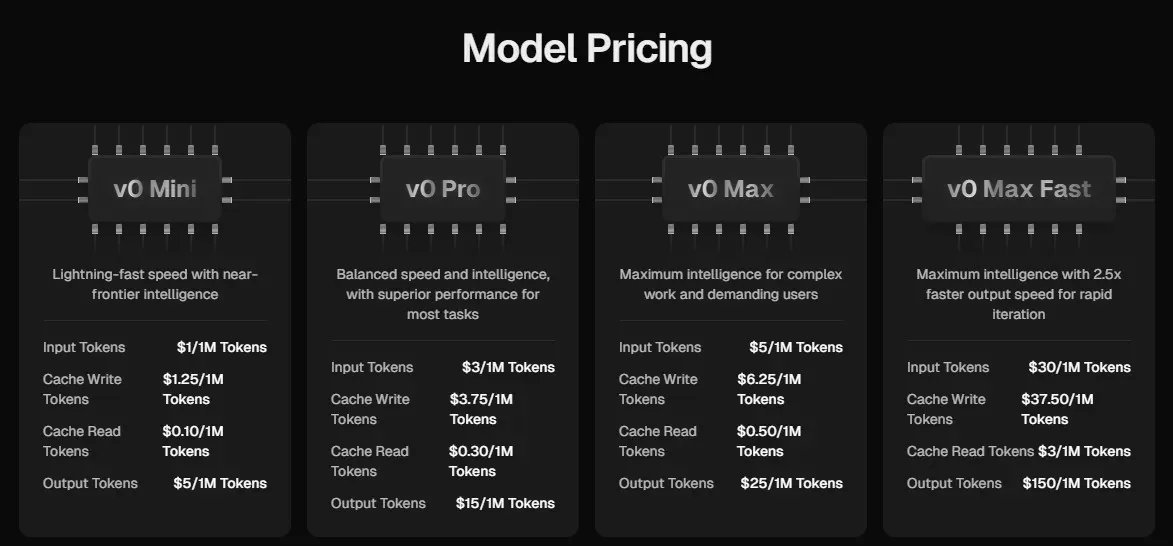
As we briefly mentioned above, credits aren't consumed uniformly, but based on which AI model you're running, how many input tokens your prompt uses, how much context v0 includes automatically, and how many output tokens the response gives. V0 also includes relevant context into the input token count (chat history, source files and Vercel-specific knowledge) when generating responses, which means longer conversations cost more even if your written prompts stay short.
The four current model tiers:
In practice, a simple component on v0 Mini barely registers against your balance. A complex iterative session on v0 Max with longer prompts, multiple revisions, growing chat history and higher quality responses can consume a significant portion of your monthly included credits before you've finished the first feature. Power users doing serious rapid prototyping work should budget for additional credits, because the base allocation won't cover a full sprint.
v0 generates clean, idiomatic React components with Tailwind CSS and shadcn/ui components. Not the kind of code you look at and immediately start rewriting—usable code that follows current frontend conventions. For developers building in Next.js, it handles the scaffolding work that nobody enjoys: auth forms, pricing pages, dashboards, navigation headers and data tables.
The GitHub integration is genuinely good. v0 can import existing GitHub repositories, pull environment variables and configurations automatically, create branches and open pull requests directly from the chat interface.
v0 handles full-stack apps more capably than its earlier versions. Authentication, database connections and external API integrations—these are all in scope now, with server-side features running properly in the sandbox preview environment. One-click deployment to Vercel means a live preview URL, useful for sharing working examples quickly with stakeholders or users.
Figma import lets you upload a design, screenshot or mockup, and v0 converts it into working code, analyzing both the visual layout and underlying design tokens like color palettes and spacing.
v0's agentic capabilities can search the web, inspect live sites, handle debugging issues and iterate on output based on feedback rather than functioning as a single line prompt-to-code generator.
If you're a product manager, founder or designer, the v0 limitations get annoying fast.
You're not looking for a tool that outputs React. You need something that helps you communicate ideas visually, get feedback from users before you build, and move quickly without every step requiring a developer.
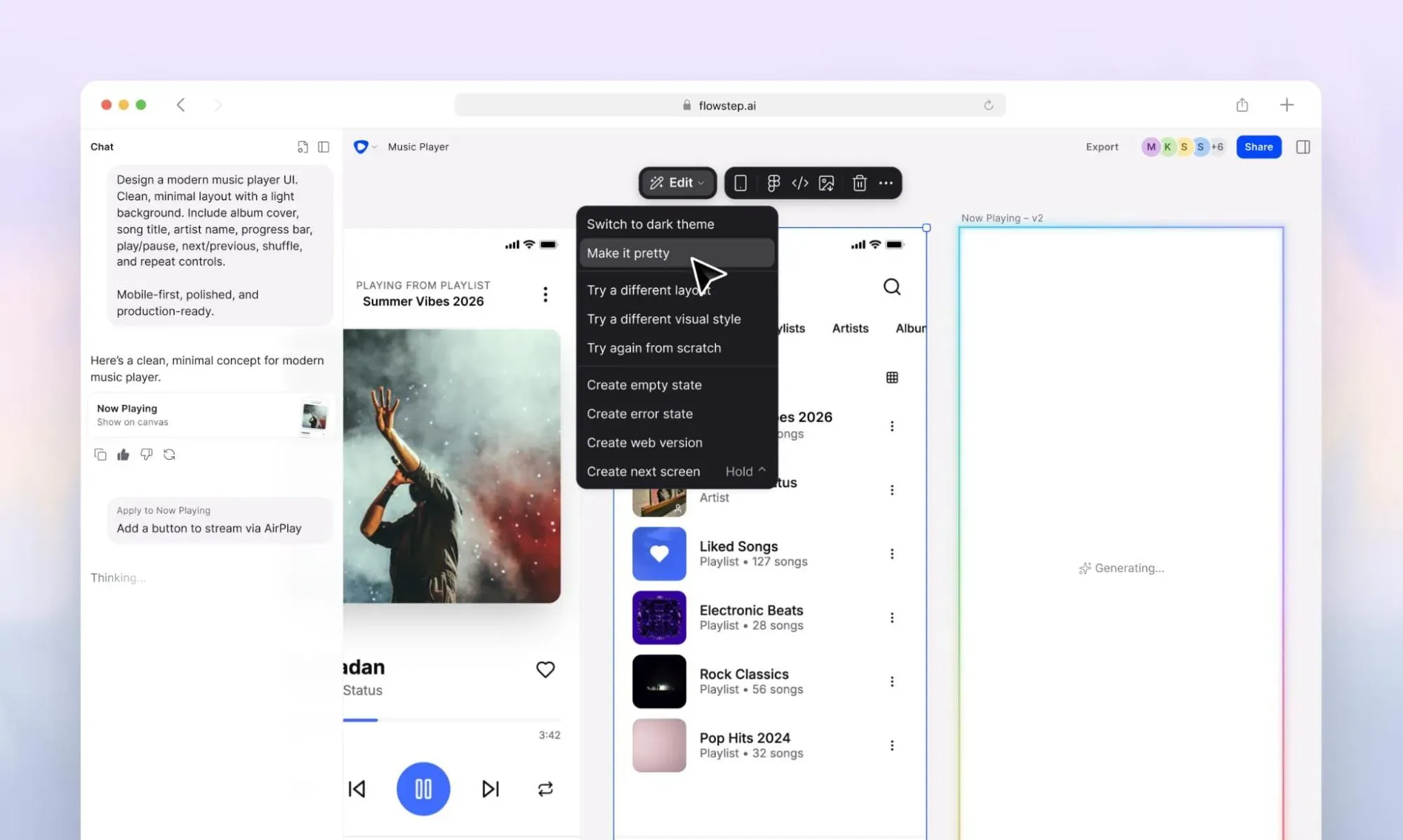
Flowstep is an AI UI design tool that generates real, editable interfaces from text prompts. You get production-ready code, too, but not as the only export option. The main output is visuals that a PM can share in a user interview, that a founder can put in front of investors, and that a designer can take straight into Figma with one click.
This AI design assistant creates usable, editable screens on an infinite canvas. You can map out entire user flows—not just individual UI components—and see how a full experience connects. Log in through onboarding through the dashboard, all from one prompt, all editable without touching code. You can even generate multiple iterations of an idea from one prompt, without using up obscure amounts of tokens.
You can bring in references (PRDs, screenshots, a URL for design inspiration) directly onto the canvas alongside your prompt. More context going in means a better first output, fewer revision cycles and no additional credit usage. In fact, we charge based on message count, not obscure credits. Errors don't eat your allowance, and neither do manual edits (which are super intuitive and don't need a design or developer background).
The Figma workflow lets you copy any Flowstep design directly into Figma with ⌘C + ⌘V. No plugin install, no export step—it pastes with layers intact. Real-time collaboration means the whole team (PMs, designers, engineers) can work on the same canvas at the same time. Cursors visible, edits live, feedback in context. No version control conversations.
And when it's time to build? Flowstep exports clean React, TypeScript and Tailwind CSS code. You can also pipe code into Claude Code, Cursor or Windsurf via MCP. So you're not choosing between design tools and developer tools—you get both, without switching platforms.
Try Flowstep free. The monthly plan with access to all features, unlimited collaborators and projects is $15. Pay extra only if you need more AI usage.
v0 is a serious tool for developers who live in the React/Next.js world. If that's your context, the Team plan at $30/user/month is a reasonable value—solid UI generation, improved full-stack capabilities, good GitHub integration, real deployment options, and a credit model that works if you're disciplined about which model you're running, even if the token math takes some getting used to.
But v0 is not a complete solution for a full product team. It generates code, not visual designs. It works best inside the Vercel ecosystem. It doesn't help non-developers communicate product ideas easily, run visual user tests, or get a design to a stakeholder without designer or developer help.
Know what your team actually needs before you pick a plan. If it's visual designs your whole team can use to think, test and ship faster—Flowstep is where to start.
Yes. The free tier includes $5 in included credits per month and a seven-message daily cap. Free users can't purchase additional credits or access the API. It's more of a trial, not for sustained building.
The interface is accessible—you type in plain English, v0 responds in the chat interface, and the previews look polished. But the output is React code, which limits its practical value for anyone who can't deploy it. Non-developers who need visual designs rather than components are better served by AI design tools built for that workflow, like Flowstep.
Each plan includes monthly credits that reset at the start of your next billing cycle—credits do not roll over. Generations consume credits based on the model selected and the total input and output tokens in the session. Longer prompts, complex output and accumulated chat history all add to the token count. Team and Business plans allow you to purchase additional credits once monthly usage is exhausted.
For full-stack apps with deep backend logic built in from the start, Bolt and Lovable are worth exploring. For visual design—editable screens, infinite canvas, Figma export, real-time collaboration—Flowstep is the stronger choice for product teams who need to prototype and communicate ideas visually before engineering picks them up.