16 Best AI Tools for Designers: 2026 Top Picks
Discover the best AI tools for designers [2026], including Flowstep, Figma Make and more top picks to speed up your UI/UX workflow and create better designs faster.
Looking for UX Pilot pricing details and features? Our comprehensive UX Pilot review compares plans, user feedback, and includes a better alternative for your design needs.
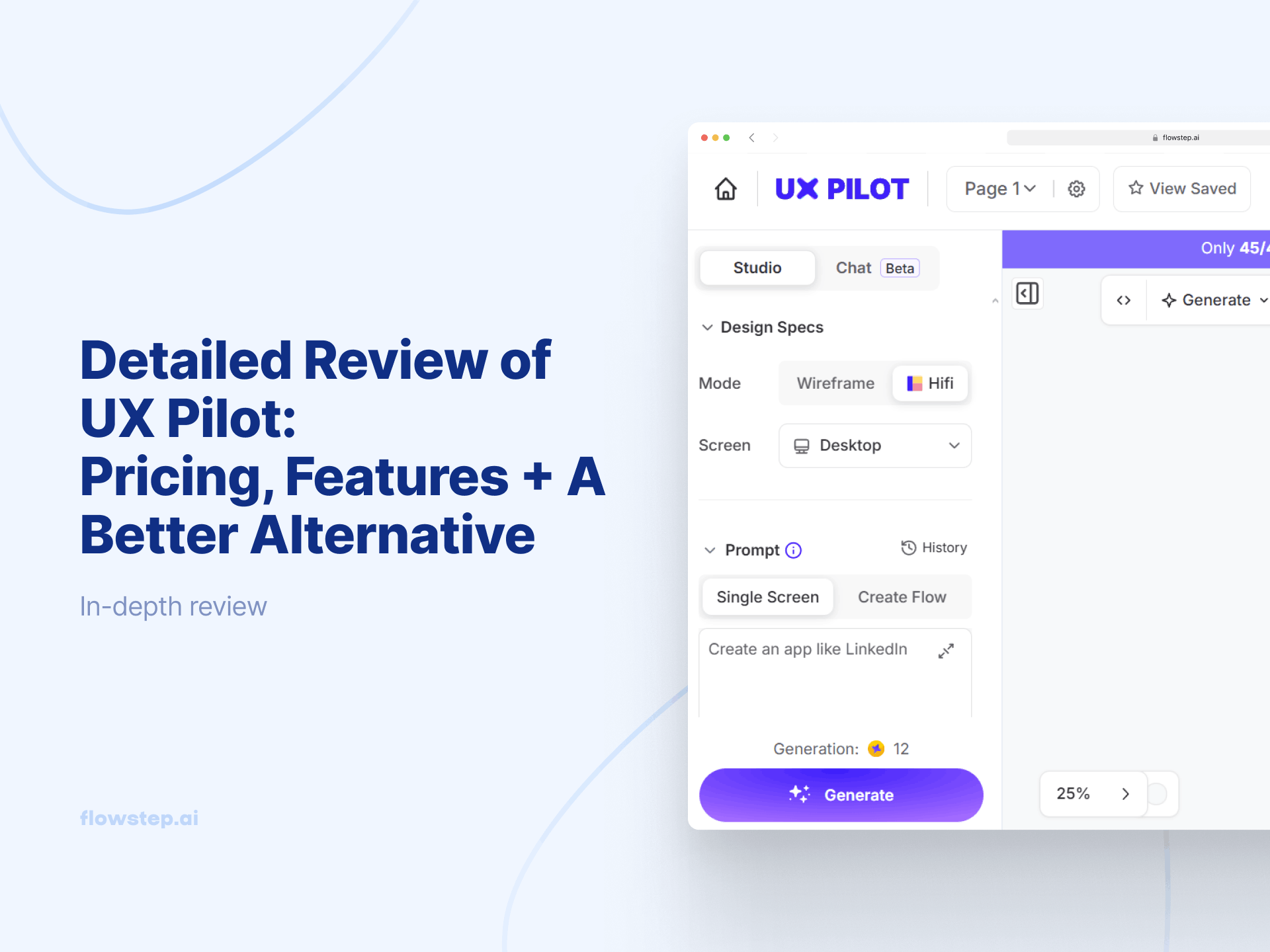
The promise of AI design tools is simple enough: describe what you want in plain language, get usable designs in seconds. UX Pilot is one AI-powered tool in this space, but it comes with its drawbacks. You'll hit a wall when you want to add more than five projects, or when you want to export your design and hit a paywall.
This article breaks down UX Pilot's core capabilities and real user feedback, and walks you through the exact UX Pilot pricing structure (including what happens when you run out of credits). We'll also show you a better alternative that eliminates UX Pilot's limitations.
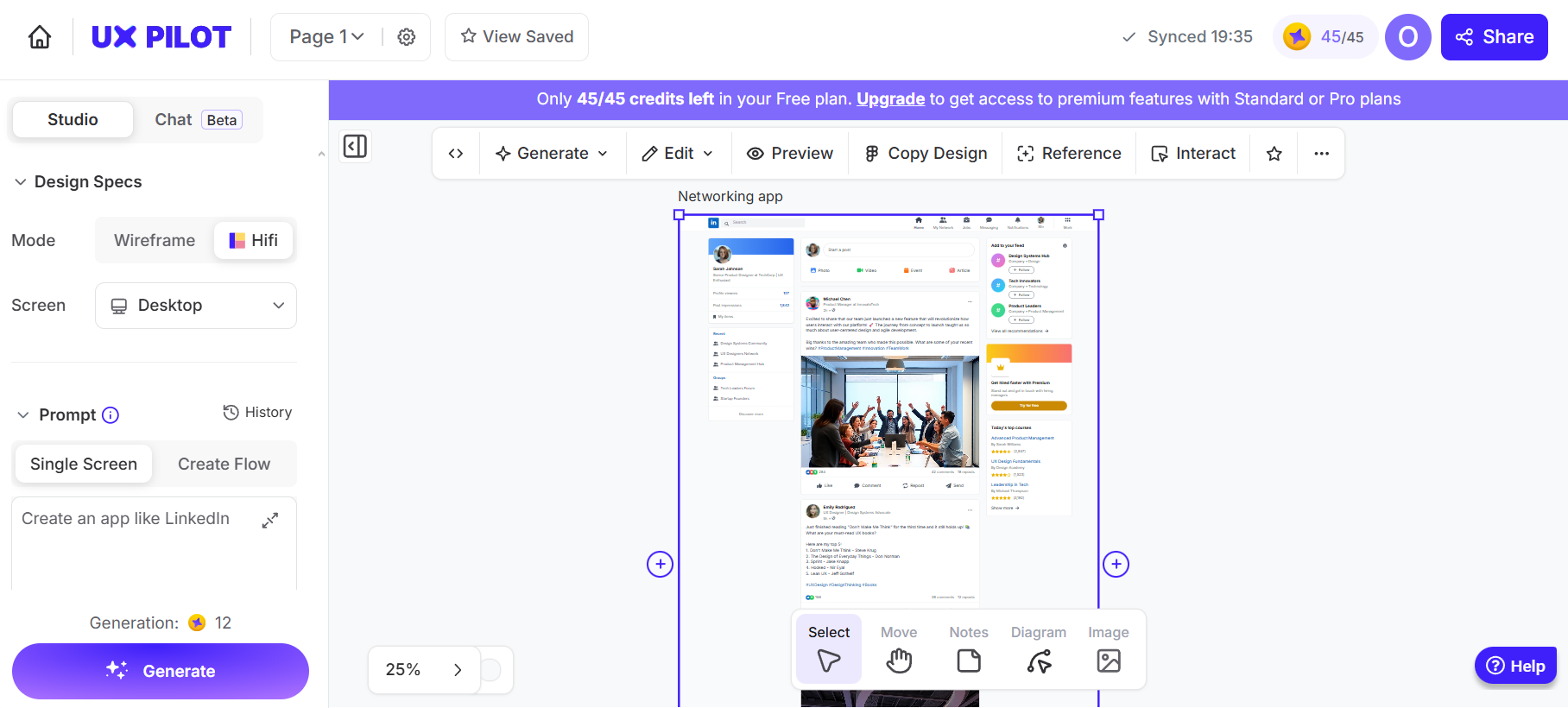
UX Pilot is an AI-powered design tool that helps product teams generate wireframes, high-fidelity UI designs, and screen flows from text prompts. It was founded by Adam Fard, aiming to bridge the gap between UX theory and practical application in the early stages of product development.
The tool works in the browser or via a Figma plugin. Describe a screen or user flow in natural language, and UX Pilot generates structured layouts based on established design patterns. The chat interface makes it conversational—like talking to a junior designer who understands UX principles but needs direction to meet user needs.
UX Pilot is for UX designers, product managers, and founders who need help during the ideation phase, without building from scratch each time.
UX Pilot helps in the design process with:
UX Pilot doesn't allow you to copy designs directly to Figma without first installing their plugins, which can be limiting compared to tools with native clipboard export. The Figma export is only available on paid plans. Figma components import is gated by an even higher tier.
Once installed, it lets you generate designs directly in Figma or transfer your existing designs from the web app. Your subscription credits work across both platforms, so you're not paying twice. The export preserves layers and structure, which saves time compared to rebuilding layouts manually. However, the tool doesn't integrate directly with any design tools other than Figma.
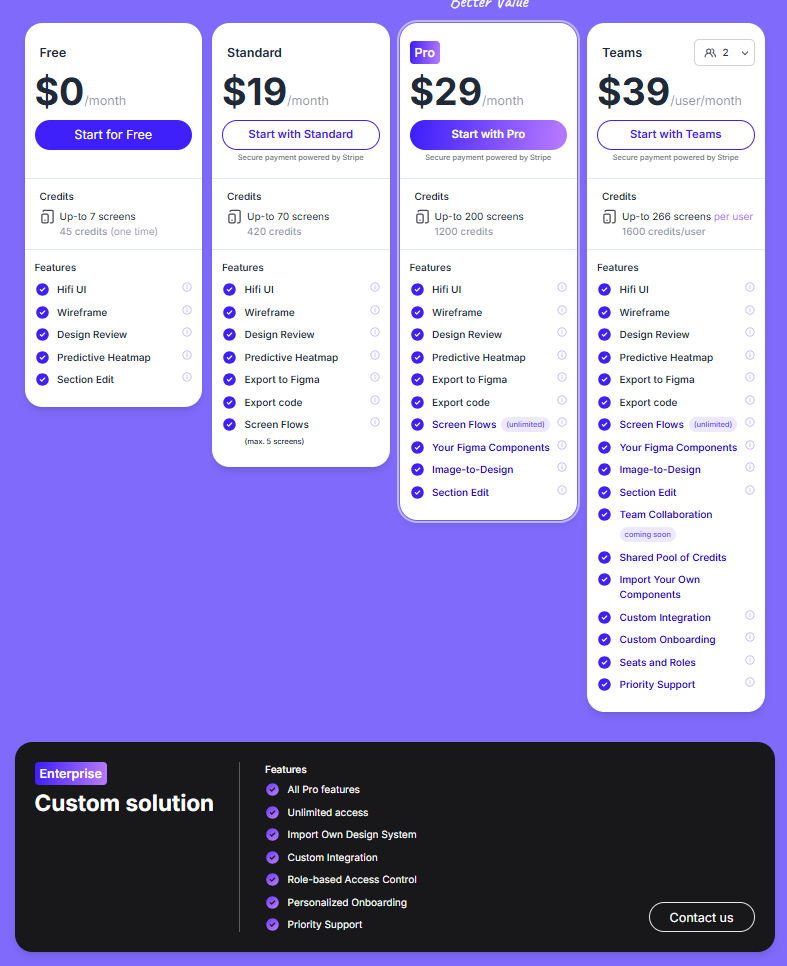
UX Pilot pricing runs on a credit system. Let's break it down so you know what to do when running out mid-project.
A 25% discount applies to all paid tiers when billed annually. When you're on a paid plan, you can also purchase additional credits. Unused credits roll over until your next billing cycle, which is good if you have inconsistent design needs month-to-month.
You need to know, though, that each action costs credits. Generating three wireframes might deduct 10-15 credits. A high-fidelity screen could cost 20-30 credits. Heatmaps and major edits also consume them. The exact deduction varies based on complexity, so it may be difficult to gauge upfront how much you'll need. Although users report that the credit system bills predictably once you understand your usage patterns.
Your account stops generating new designs mid-subscription. You can still view existing work, but cannot create anything new until you upgrade plans or wait for your monthly credit refresh. Some users mention that this abrupt halt disrupted their momentum during critical project phases.
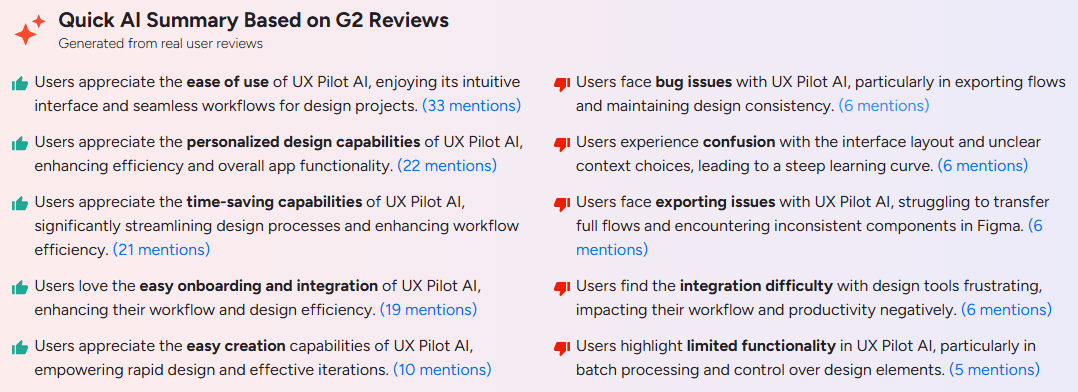
UX Pilot has a 4.5/5 rating on Capterra and 4.2/5 on G2. Here's what actual users say about their experience with this AI-powered tool.
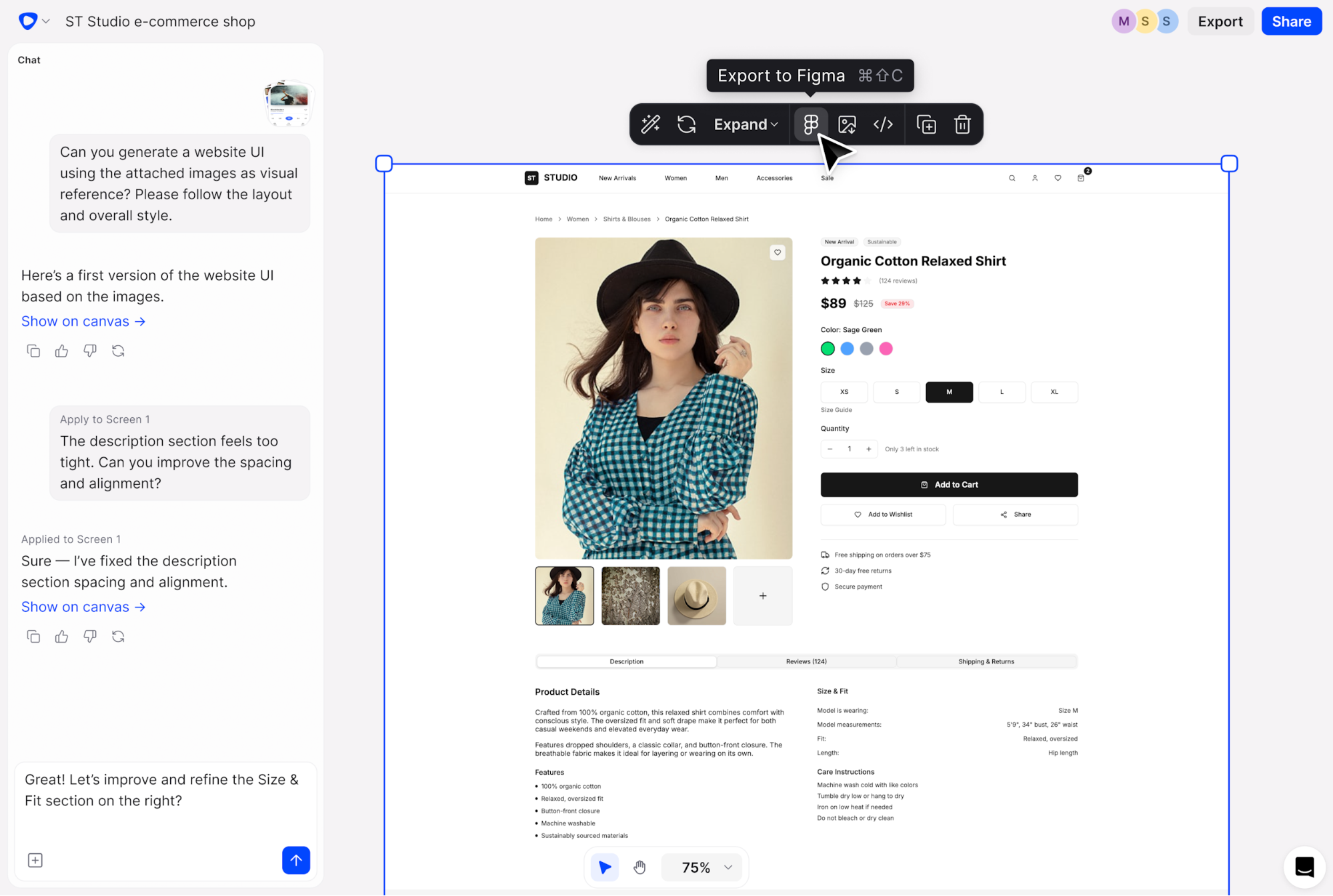
Flowstep is a UX Pilot alternative that takes a different approach to AI design. Along with a clear pricing model, Flowstep gives you an infinite canvas where AI boosts your creative process, making it one of the more flexible AI tools for product teams.
Here's how Flowstep works:
Watch your idea come to life with a single sentence.
Flowstep has a completely free plan with access to all features and any number of users.
The paid tier is $15/month with unlimited screens, projects, exports and copy-pasting into Figma.
This plan includes 80 messages, where 1 prompt = 1 message. You pay $29 for 240 messages and $99 for 1000 messages, all with unlimited collaborators.
Flowstep also offers a 20% discount on annual billing and a custom enterprise option.
Both tools are solid AI UI design tools, but with different approaches. UX Pilot focuses on design ideation, validation and analysis with structured AI tools for UX quality assessment. Flowstep prioritizes speed and team workflow through natural language interaction and unlimited creative exploration. Your choice depends on whether you value AI-powered design mockups and feedback (UX Pilot) or production-ready designs you can easily collaborate on (Flowstep).
If you're specifically interested in wireframing tools, we've covered the best AI wireframe generators and have a separate guide on how to write effective wireframe AI prompts.
If you're a solo designer who wants structured validation feedback and only needs design inspiration for later adjustments, UX Pilot's predictive heatmaps, design review features and fairly fast visuals generation can be good.
But if you're a product team that needs to iterate fast, collaborate in real-time, and don't have the budget for per-user pricing, Flowstep removes those friction points. The free plan doesn't limit you to basic features or a low screen count. The native Figma integration (just copy+paste) eliminates plugin friction. Our AI tool for product managers helps even non-designers visualize ideas and bring them to production level quickly and intuitively.
Try Flowstep free and turn your ideas into designs at the speed of thought.
UX Pilot offers a free plan with 45 credits, a Standard plan at $19/month with 420 credits, a Pro plan at $29/month with 1,200 credits, and a Teams option for $39/month/user. Enterprise pricing is custom.
Flowstep pricing starts from $15 for unlimited users and screens.
UX Pilot provides a forever-free plan with 45 credits rather than a time-limited trial. You can test some of the basic features, including wireframes, high-fidelity designs, and predictive heatmaps, but you have to commit to a professional plan if you want more features or credits.
Flowstep's free plan includes all features, 80 messages and unlimited users and screens.
You need the Standard plan (from $12/month) for a UX Pilot account that supports Figma export through a plugin. If you want to import from Figma, you need the Pro plan (from $22).
A UX Pilot alternative—Flowstep—connects to Figma on all plans. All you have to do is click copy+paste, and all the layers get smoothly exported into Figma.
Your account stops generating new designs once credits run out. You can view existing work but can't create anything new until you upgrade plans, buy more credits or your monthly limits refresh.
Unused credits roll over to the next billing cycle.