10 Best Design to Code Tools for 2026 (Prompt-to-Code, Figma Export & Handoff)
Compare the 10 best design to code tools of 2026: AI design engineers, Figma-to-code converters, app builders and handoff tools.
Discover the best AI tools for developers in 2026—not just coding assistants. From UI design to code review, here's your complete developer stack guide.
You open your IDE, your AI-powered coding assistant is running, code suggestions are flying in, and you're shipping faster than you were a year ago. But your last feature took three rounds of revision because nobody on the team agreed on what it was supposed to look like until after it was built.
The code got written faster. The wrong thing still got built.
According to a 2026 AI Pulse survey of over 10,000 professional developers worldwide, 74% have adopted specialized AI tools—but adoption clusters almost entirely around in-editor assistants. Pre- and post-code tools are still massively underused, which means most developer stacks have a structural gap that all the autocomplete in the world won't fix.
This article covers the best AI tools for developers in 2026 across three stages of the real workflow: pre-code (figuring out what to actually build), in-code (writing and refactoring) and post-code (review, security, docs).
See also: Best AI tools for web design that help you go from blank canvas to editable screens.
Most AI coding tools activate when you open a code editor. The problem is that the most expensive mistakes happen before that—when a PM's mental image of a feature, a designer's sketch and an engineer's interpretation of the spec are completely different.
You can't prompt for the right output if nobody has agreed on what that is. That requires shared visual context, not another AI-powered coding assistant in your editor sidebar.
The result is code churn. You build something. It gets reviewed by someone who imagined something else. You refactor code. Repeat.
Here's an automation process that saves you from that loop:
![Flowstep - one of the best AI tools for developers [2026]](https://flowstep.ai/blog/content/images/2026/05/Flowstep-UI-generator-creates-a-SaaS-analytics-dashboard-for-a-B2B-founder-1.webp)
The best AI tools don't all live in your editor. Flowstep is for the moment when someone has an idea but no way to show anyone what it looks like.
It's an AI design tool that generates real UI from natural language prompts. Describe a dashboard, an onboarding flow, a settings page—and it appears on an infinite canvas as actual, editable UI; something you can share, review and hand off to engineering with the design and code already done.
For developers specifically, that handoff is what matters. You get production-ready code in React, TypeScript and Tailwind CSS or pipe the code into Cursor, Claude Code or Windsurf via MCP. Any design copies straight to Figma with two clicks of ⌘C and ⌘V. Real-time collaboration is built in, so your PM, designer and engineer can all be on the same canvas, leaving feedback on the same screens before a single line of source code gets written.
Attach PRDs, paste links, upload reference images—Flowstep uses them to guide what it generates. It's closest in feel to vibe designing: you describe, it builds, you react. That loop is fast enough that you can run it in a product meeting and arrive at alignment before anyone leaves the room.
Free tier available to get started. Paid plans for teams needing more generations and exports, starting from $15/month for 80 messages and unlimited collaborators. Annual and volume discounts available.
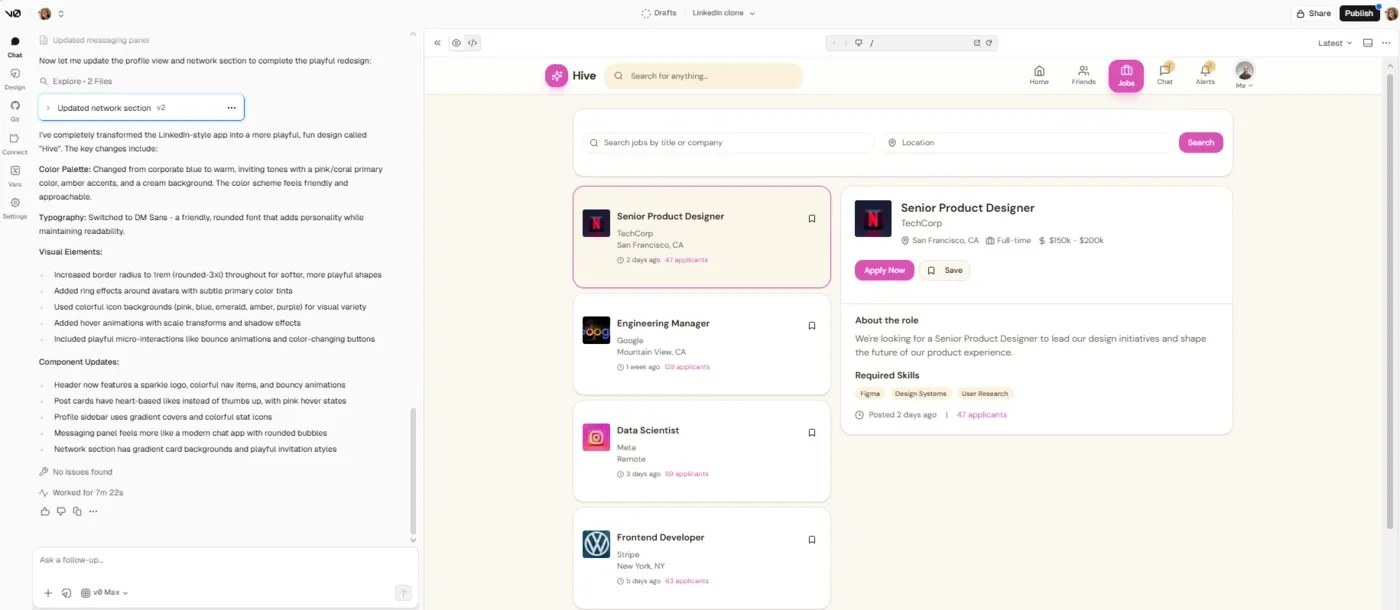
v0 turns natural language prompts into production-ready React and Next.js UI components using shadcn/ui and Tailwind CSS. The output is clean, accessible, responsive and structured to drop straight into a real codebase.
Describe a component, refine it in chat, then sync to GitHub or deploy directly to Vercel. It includes a VS Code–style editor, supports branch creation and offers built-in safety checks that block insecure code from being deployed.
It’s strong for rapid UI prototyping and building component libraries. You can go from idea → component → deployed UI in minutes.
Vercel is strongly integrated with the Vercel/Next.js ecosystem, so it’s best suited if that’s already your stack.
See also: v0 alternatives for design and development
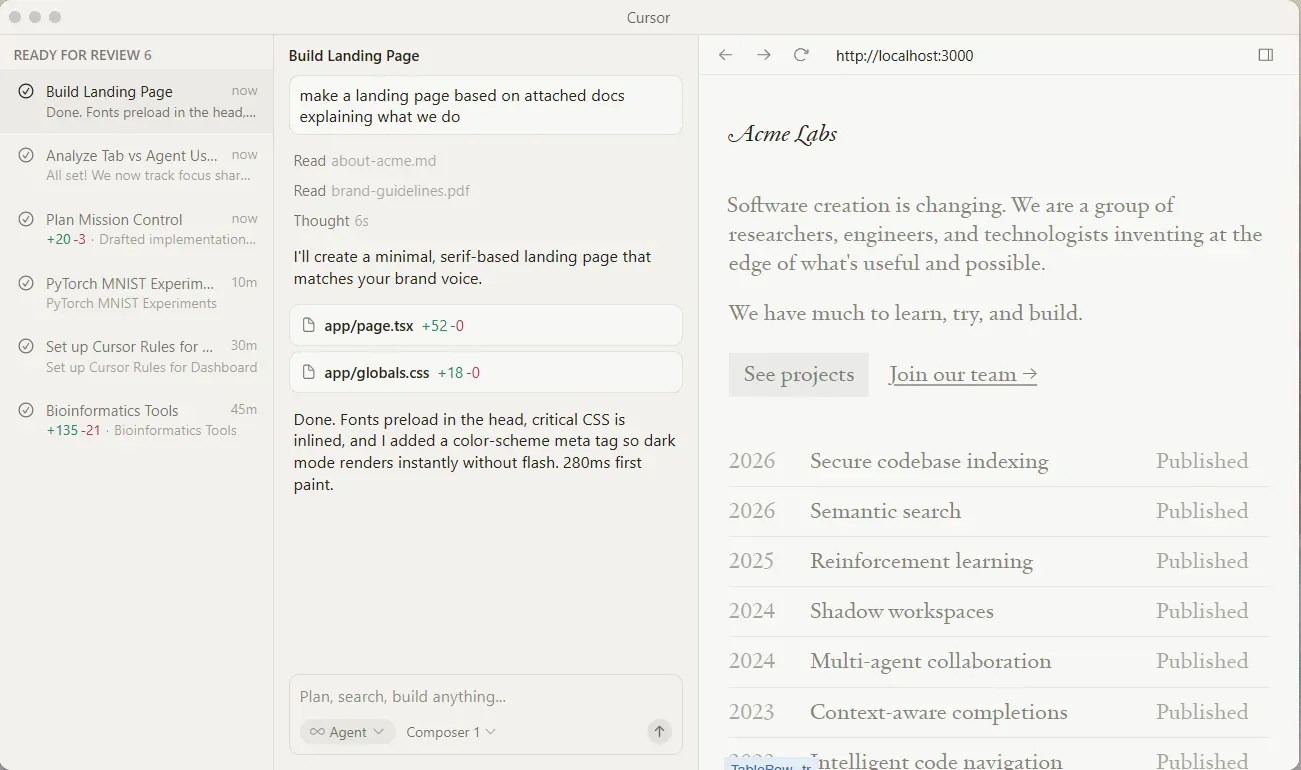
Cursor is a VS Code–based editor with AI woven directly into the development workflow. It understands your entire codebase through deep indexing, so suggestions, edits and answers are context-aware, aligned with your project structure.
Agent mode lets you describe a feature, and Cursor plans the changes, edits across multiple files, writes boilerplate, and can generate tests.
Cursor chat lets you ask questions about your codebase mid-flow, while tab autocomplete predicts your next move across files. It also includes smart search and refactoring tools that work across large repositories.
Multi-model support (OpenAI, Claude, Gemini, Grok) lets you choose the best model for each task, whether you're generating code, debugging or exploring ideas.
Cursor is best thought of as an AI pair programmer for professional developers. It significantly speeds up routine work—scaffolding, refactoring and iteration—but it’s not a replacement for engineering judgment, especially on complex architecture decisions.
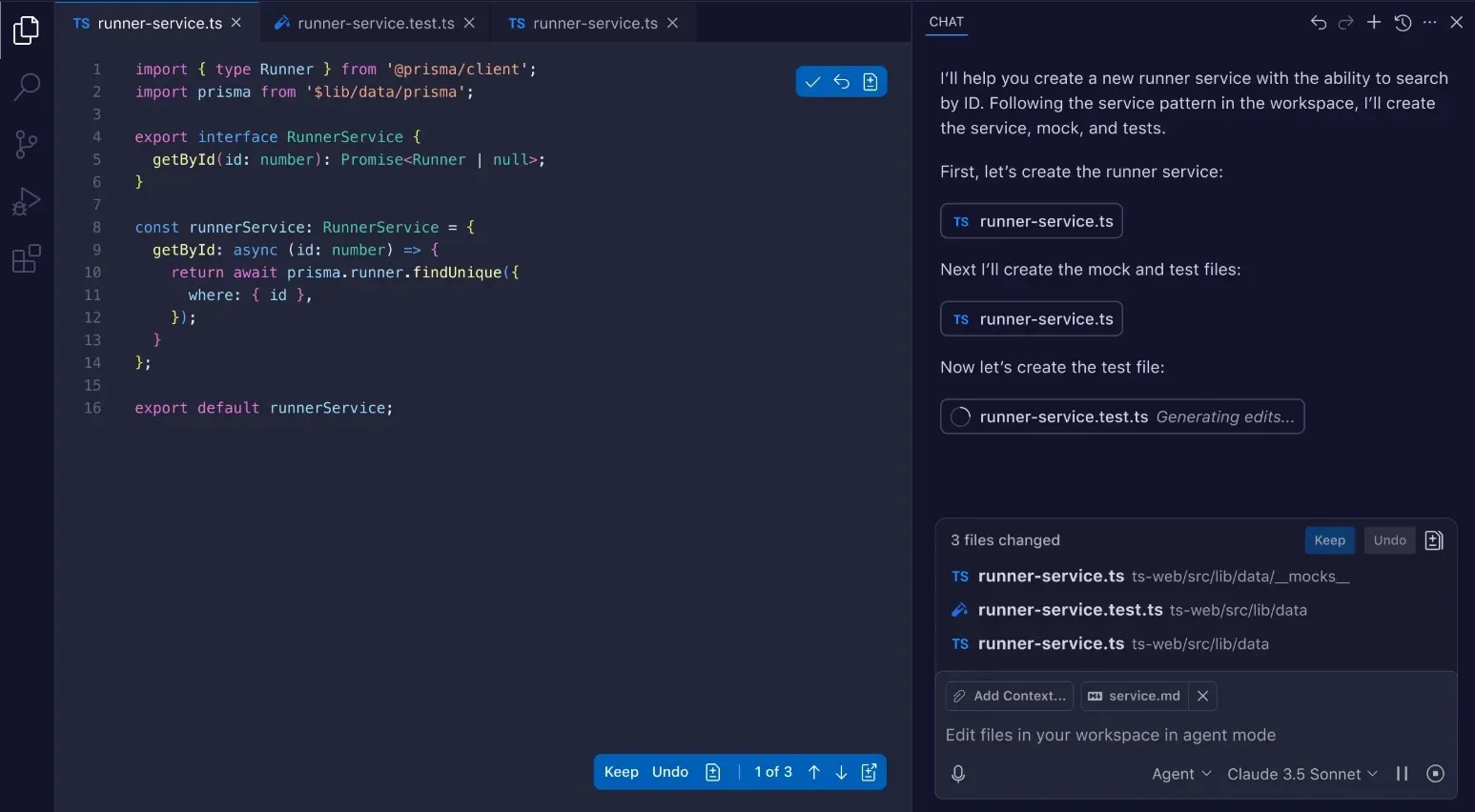
GitHub Copilot is an AI pair programmer embedded directly into your development workflow. It works across all major editors—VS Code, JetBrains IDEs, Visual Studio, Xcode, Neovim, Eclipse and more—and extends into GitHub itself and the CLI.
It handles the day-to-day friction of development: inline suggestions, code completion, bug fixing and documentation generation, letting you assign tasks to Copilot (or other agents), so it can plan, write and edit code across files or at the pull request level.
Copilot supports multiple models (OpenAI, Anthropic, Google, etc.), letting you choose between speed, cost and reasoning depending on the task.
It’s not an app generator, though. Copilot is strongest when augmenting real development work—writing, reviewing and iterating on code you already understand.
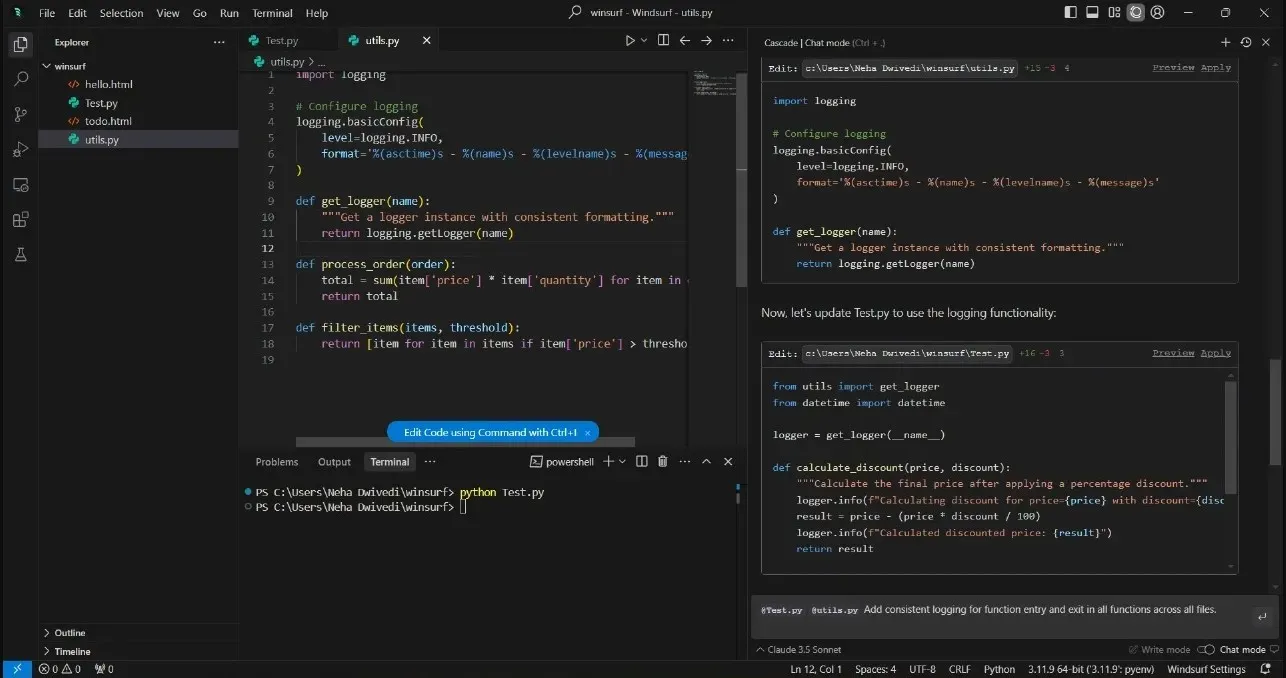
Windsurf is built for large, messy projects where context management matters more than raw generation.
Its core is the Cascade agent, which understands your codebase, plans multi-step changes across files, fixes issues like linter errors automatically, and can execute terminal commands using natural language. It tracks what it changes and why, making larger edits more reliable than typical autocomplete tools.
Windsurf extends beyond local editing with Devin, a cloud-based agent that can take on longer-running tasks—debugging, writing tests or implementing features. SuperComplete predicts the next logical action in your workflow.
This tool is best suited for developers working in complex repositories who want deeper automation than standard AI coding assistants.
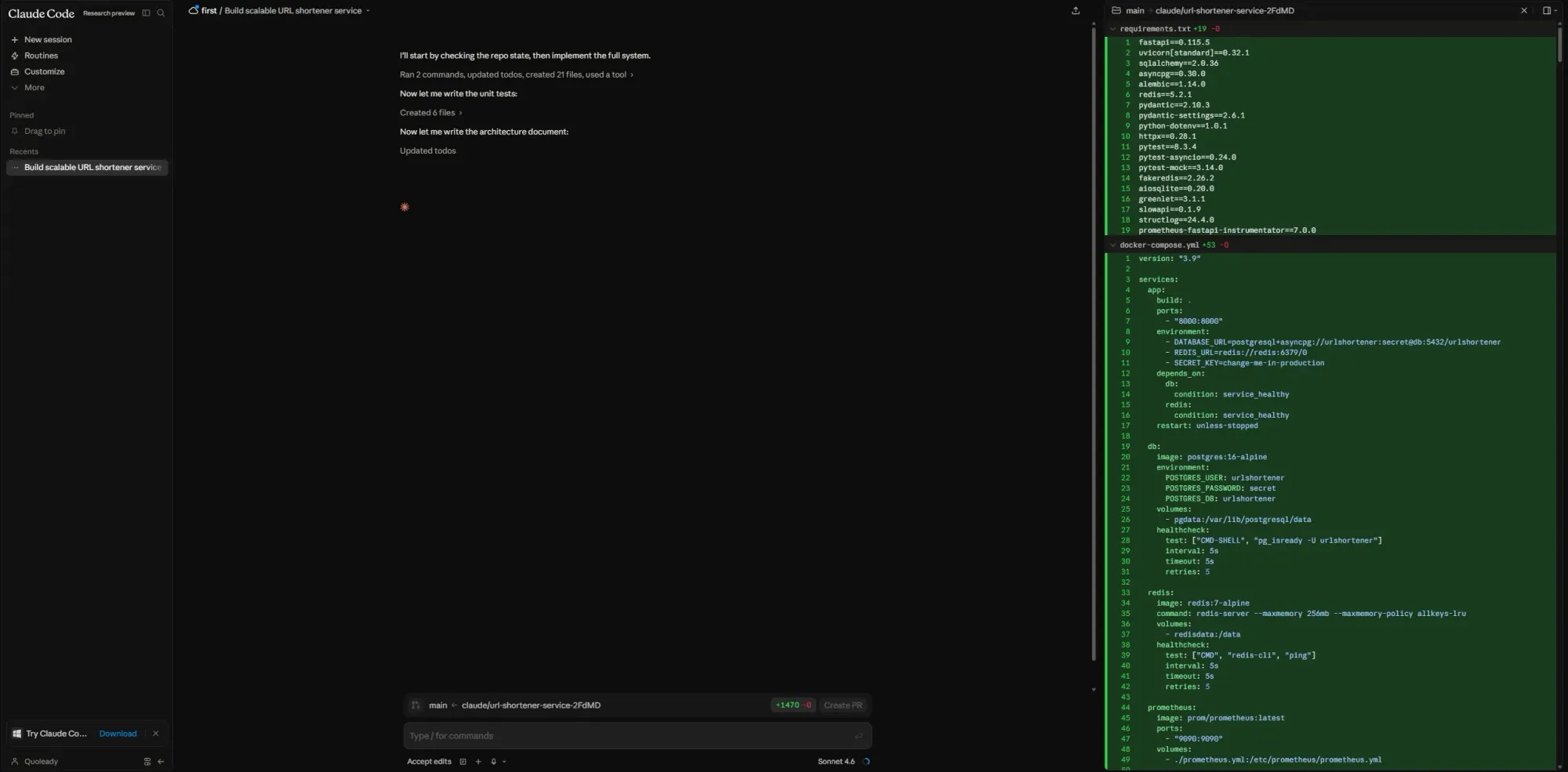
Claude Code is Anthropic’s agentic coding assistant for developers working on complex codebases. It can read your project structure, trace dependencies, edit across multiple files, run commands, inspect errors and iterate until a task is complete.
It works across terminal, desktop, VS Code, JetBrains, web, iOS and Slack, with deep codebase reasoning for difficult engineering work.
Claude Code is strongest on large refactors, inherited codebases, multi-file debugging, test generation and tasks where it needs to understand a lot of context before making changes. Project memory through CLAUDE.md helps it follow coding standards, architecture decisions and team conventions across sessions.
It also supports MCP integrations, so it can connect to tools like GitHub, GitLab, Slack, Datadog, Linear, Supabase, Docker and PostgreSQL. Team and Enterprise plans add dedicated code review workflows, including multi-agent PR review.
This is not a tool for non-technical users. Claude Code assumes you're comfortable reviewing code, guiding implementation and judging architecture.
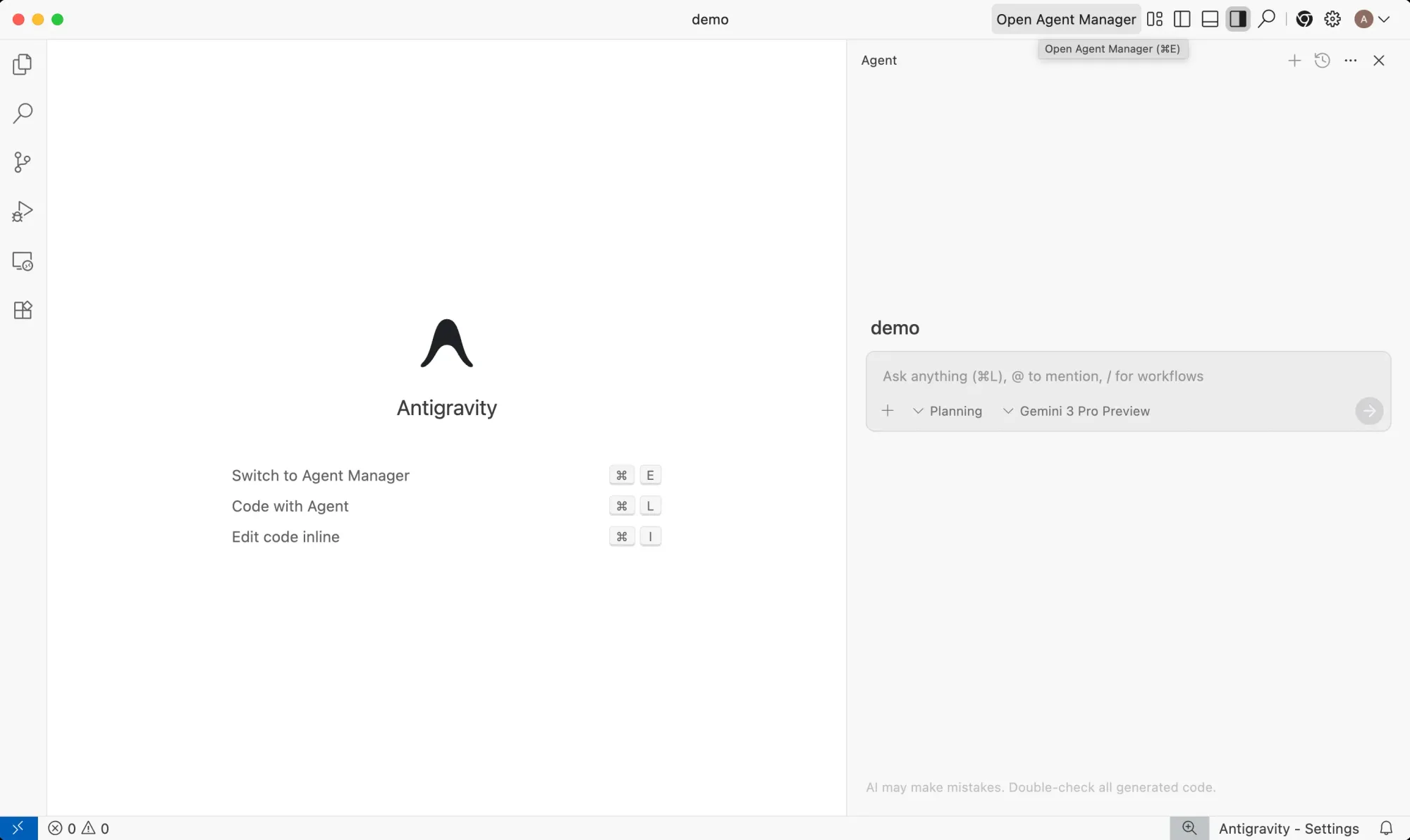
Google Antigravity is an agent-first development platform with AI agents that operate as active collaborators. Built on a modified VS Code foundation, it combines a traditional coding environment with a dedicated Manager View where you can run and coordinate multiple AI agents simultaneously across different parts of a project.
The standout feature is its multi-agent workflow system. Agents can work across the editor, terminal and browser while reporting back through structured Artifacts like implementation plans, diffs, screenshots, recordings and verification results. You can review feedback and guide execution without interrupting the workflow.
Antigravity supports multiple models, including Gemini 3.1 Pro, Claude Sonnet, Opus 4.6, and GPT-OSS-120B. It also includes a knowledge layer that carries project context and decisions across sessions.
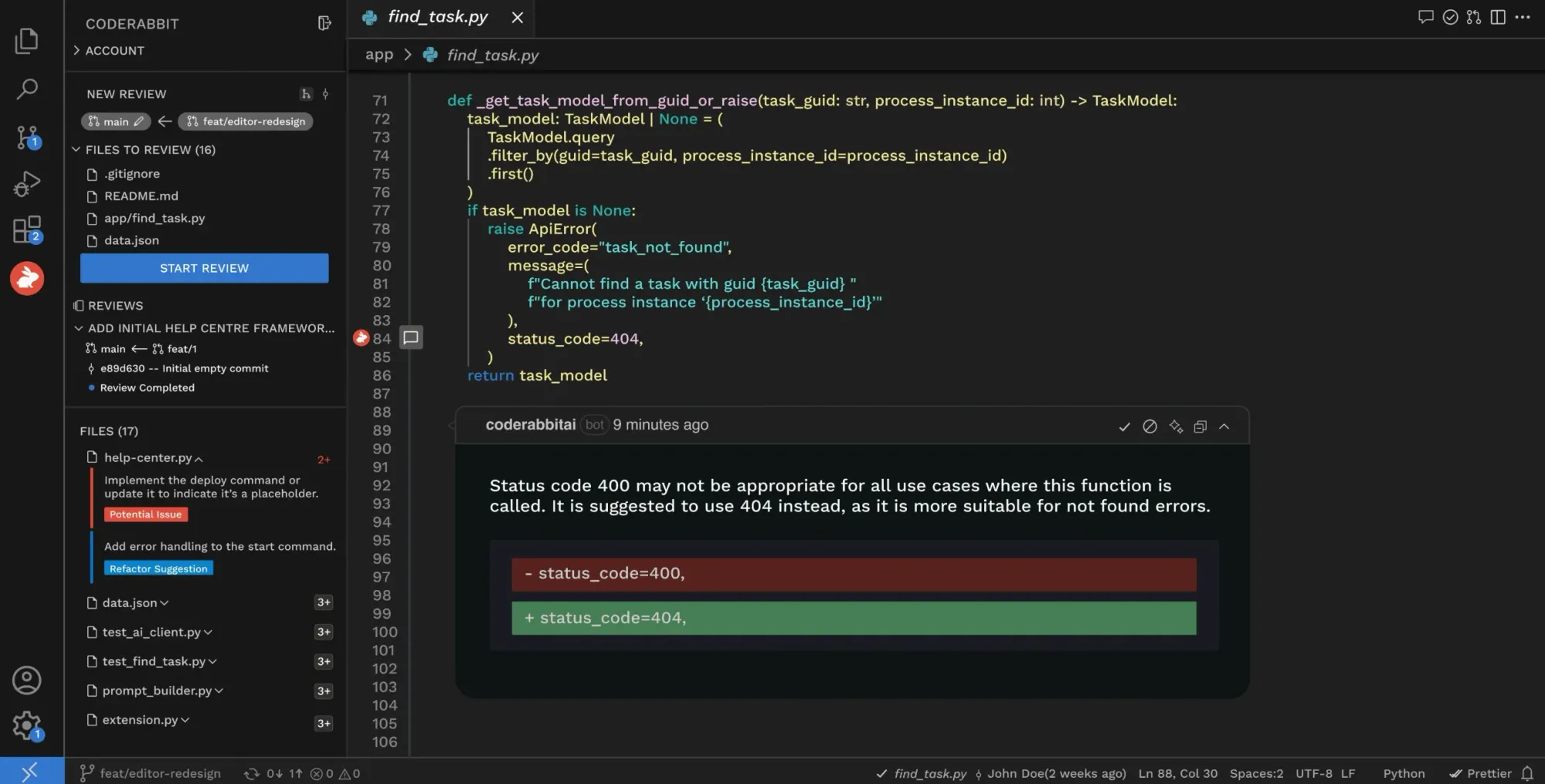
CodeRabbit is an AI-powered code review platform that analyzes pull requests the moment they open. It generates plain-English summaries, inline review comments, architectural diagrams and fix suggestions while flagging bugs, security issues and performance regressions.
The platform integrates across GitHub, GitLab, Azure DevOps and Bitbucket, and can also operate inside IDEs, the CLI and Slack. Teams can chat with the AI coding agent directly in PR threads to explain findings, generate tests, create documentation or automate follow-up tasks.
Recent additions expand beyond review into workflow orchestration. Issue Planner generates implementation plans from Jira, Linear or GitHub Issues before coding starts, while the Slack agent connects code, tickets, docs, monitoring tools and cloud infrastructure into a shared operational context.
CodeRabbit is not a coding IDE or autonomous app builder. Its role is quality control: reviewing AI-generated and human-written code with an analysis layer that catches issues before deployment.
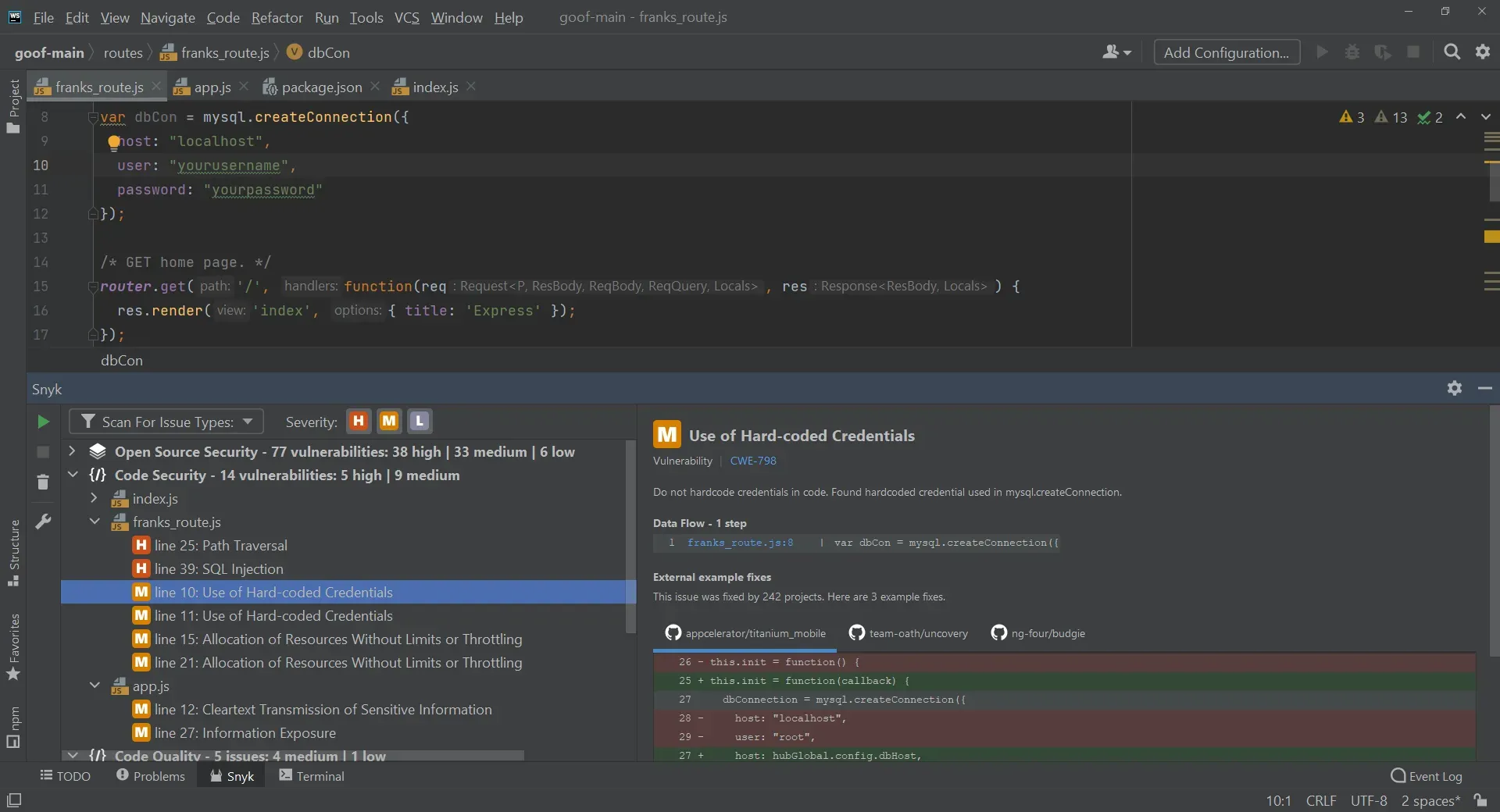
More AI-generated code means more opportunities for security mistakes to slip into production. Snyk Code catches those issues inside the developer workflow, before they become audit findings or production vulnerabilities.
Snyk Code provides real-time SAST scanning in the IDE, pull requests, repositories and CI/CD pipelines. It uses DeepCode AI, data-flow analysis and security intelligence trained on real cases to flag vulnerabilities with context-specific explanations and fix guidance.
Its strength is speed and developer usability. Developers see issues inline as they write code, with one-click fixes and automated remediation available through Snyk Agent Fix on higher plans.
Snyk also extends beyond source code into open-source dependencies, containers and infrastructure-as-code, making it more of a full AppSec platform.
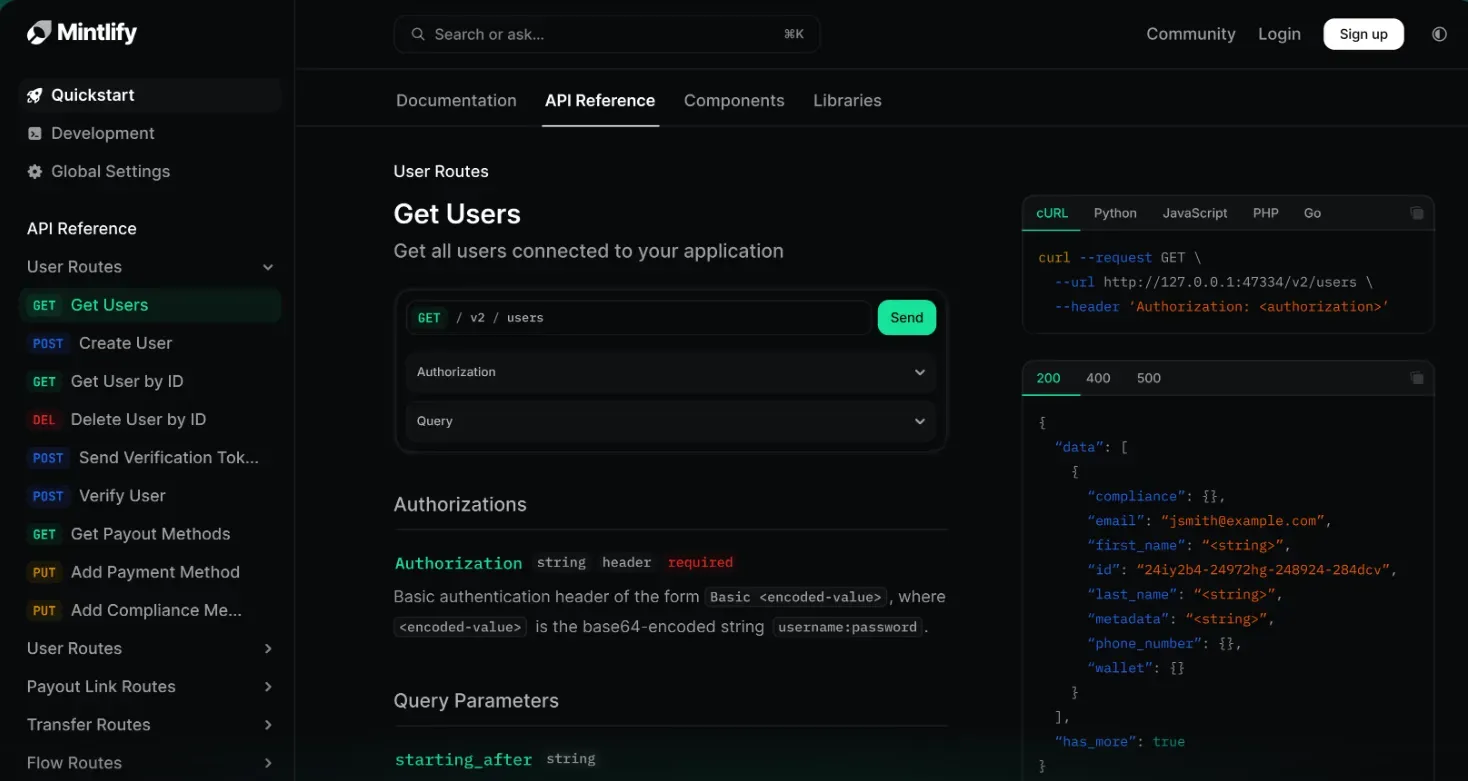
Documentation decays quickly, especially on teams shipping fast with AI coding tools. Mintlify keeps developer documentation synchronized with the product.
Mintlify uses a docs-as-code workflow where documentation lives in Git repositories, written in MDX and updated through the same pull request process as the codebase. Engineers can work directly from version control, while non-technical contributors can edit through a web interface.
Its standout feature is the AI-powered documentation workflow. The Assistant and Writing agents can generate, revise and maintain documentation automatically, while self-updating workflows propose documentation changes based on code updates and pull requests.
Mintlify also includes an interactive API playground generated from OpenAPI specs, semantic search and AI-native optimizations like llms.txt and MCP support, so documentation works well for both humans and AI agents.
The best AI tools for developers in 2026 should fill different parts of the workflow.
Start with Flowstep before any code gets written. It's the easiest and fastest way for product teams to turn an idea into real, testable UI, and to reach visual alignment before development starts. That one step removes the most expensive rework: building in the wrong direction.
From there, your in-code choice depends on how you work. Cursor or Windsurf for deep codebase editing and complex coding tasks. GitHub Copilot for low-friction AI assistance that works wherever you already are. Claude Code or Google Antigravity for agentic workflows and task delegation. Then add CodeRabbit to review code on every pull request, Snyk Code to catch security vulnerabilities before they ship, and Mintlify to keep your documentation from becoming a liability.
An AI coding assistant (e.g., GitHub Copilot, Cursor, Claude Code) helps you write, generate and refactor code inside your editor or terminal. An AI design tool like Flowstep generates real UI from natural language prompts, giving your team something visual to align on before development starts, and one-click code export of the polished design. They solve different problems. The strongest developer stacks use both: design tools for pre-code clarity, AI coding assistants for execution.
No, AI tools can generate UI from natural language prompts faster than any human can sketch it. They don't replicate the judgment a designer brings to user research, accessibility and interaction decisions. AI does change the designer's role, though. Designers and developers using tools like Flowstep spend less time on production work and more time on the decisions that actually shape products.
CodeRabbit is a solid AI code review tool that checks every pull request automatically with inline comments and structured PR walkthroughs. Snyk Code handles the security angle—scanning for vulnerabilities in both your source code and dependencies during the same review cycle. GitHub Copilot has a PR-level review, though engineering teams doing thorough post-merge analysis generally find dedicated review tools more reliable on complex changes.
Mintlify is the strongest option for engineering teams building developer-facing products who want documentation that stays accurate as code changes. Its Autopilot agent watches your codebase and proposes updates whenever a pull request touches relevant code. For inline docstrings and code comments during day-to-day development, GitHub Copilot and Cursor both generate them as part of the normal coding workflow. The best approach treats documentation as a living artifact updated continuously—not something you write once and hope stays relevant.