
OpenClaw Pricing & Review: Free and Open Source vs Actual Costs
Wondering what OpenClaw pricing really looks like once you factor in hosting and API costs? This OpenClaw review breaks down the real numbers + pros and cons.


Is OpenClaw free?
Yes—and also, not really.
The codebase is open source under an MIT license. You can download it, run it locally and pay nothing in licensing fees. But the moment you expect it to do anything useful—run continuously, automate tasks or operate in the background—you start paying in two places: infrastructure and AI model usage.
“Free” on GitHub reads very differently from “free” on your monthly bill.
Hosting alone can range from effectively $0 (if you’re willing to rely on limited free tiers or your own machine) to $20–$100+ per month for a stable setup. Add the API costs—OpenClaw doesn’t make one AI call per task; it makes several. It stores context. It runs background processes. Token usage compounds quickly, and that’s where costs spiral past expectations for many users.
So while OpenClaw can be free, it rarely is once it’s applied to real work.
This review breaks down what “free and open source” actually means in day-to-day use, what you’ll realistically spend depending on your setup and where the tool delivers—versus where the complexity, cost and risk start to make you go looking for an alternative option (yes, we've got that, too).
What is the OpenClaw AI agent?
The OpenClaw AI agent sends emails, runs cron jobs, parses accessibility trees, monitors websites for changes and executes multi-step workflows through whatever chat app you've connected it to. You message it like a person; it does essentially whatever you want.
In November 2025, Peter Steinberger, founder of PSPDFKit, released a quiet side project called Clawdbot. Two months later, it had over 200,000 GitHub stars and had been renamed twice. Anthropic sent a trademark complaint about the original name; it became Moltbot, then OpenClaw three days after that because, in Steinberger's own words, "Moltbot never quite rolled off the tongue." He later announced he was joining OpenAI. A non-profit foundation now stewards the project.
That origin story tells you something about the kind of user OpenClaw was built for—someone comfortable enough to install OpenClaw from a GitHub repo, configure their own API keys, manage server specs and debug output when something breaks. Which it will.
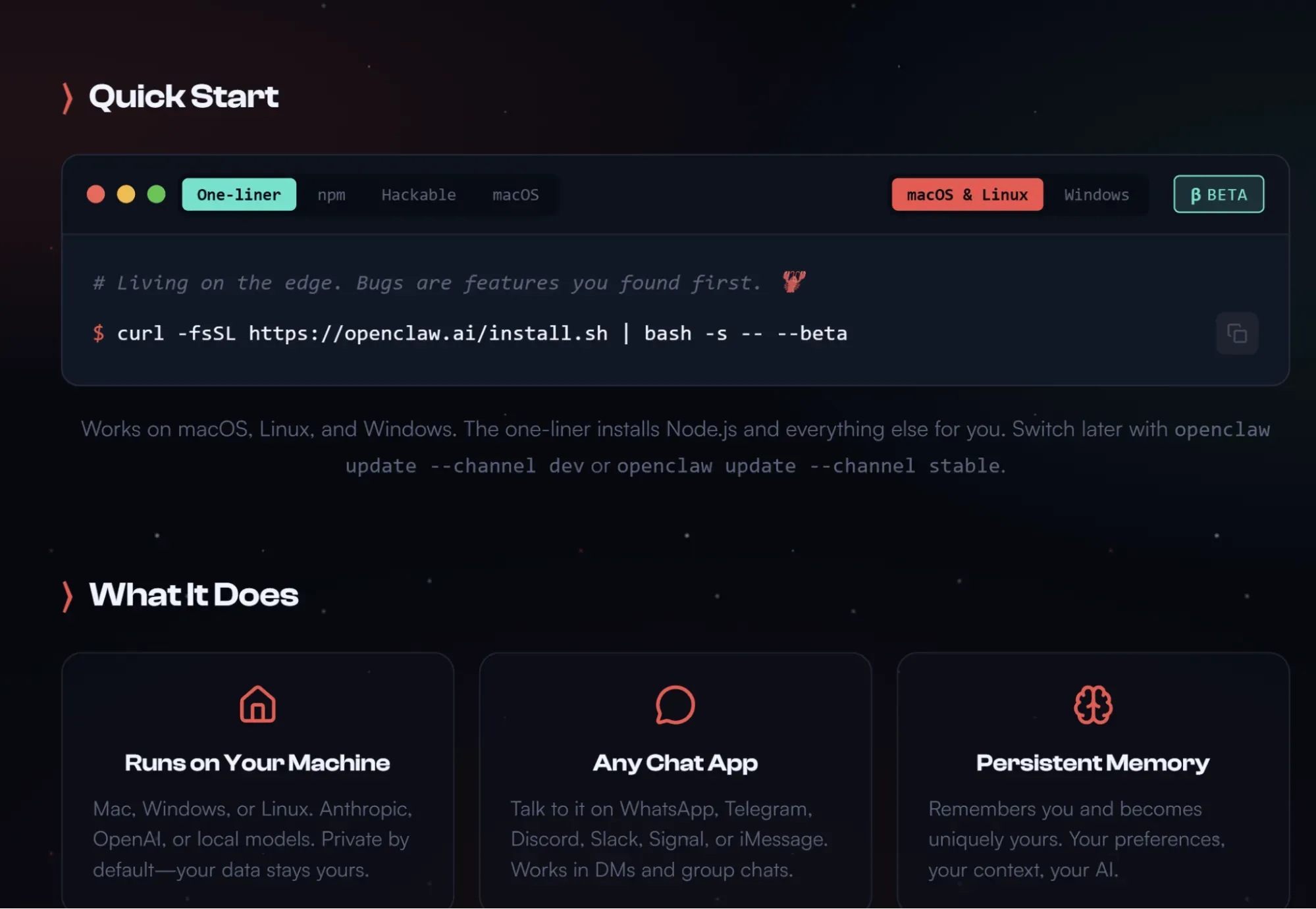
OpenClaw runs as an OpenClaw instance on your own hardware or a rented server, connects to a large language model of your choice (Claude, GPT-4, Gemini, DeepSeek or local models via Ollama) and operates through whatever chat app you've wired it to. It maintains persistent memory (markdown memory files stored locally) so context carries across sessions.
The official site lists 50+ integrations spanning chat apps, AI models, productivity tools, smart home devices and developer services—with WhatsApp, Telegram, Discord, Slack, Signal, iMessage, Gmail and GitHub among the most-used. The community plugin system (ClawHub) now has over 52,700 tools. Small businesses use it for lead processing, automated workflows and CRM updates. Researchers at companies like Tencent built services on top of it. Chinese developers adapted it to work with WeChat and DeepSeek's models.
OpenClaw pricing: what "free and open source" actually means
Here's where OpenClaw's "free" claim becomes complicated.
Yes, you can download the MIT license codebase, run OpenClaw locally, and pay exactly zero in licensing fees. It's useful for personal projects and early prototyping. But the moment you want it to do anything more complicated, you're looking at two unavoidable costs: infrastructure and AI model access + its AI usage.
Infrastructure costs
To run a persistent OpenClaw instance, you need production hardware that stays on. A local laptop works until you close it. For anything resembling active deployment, you're looking at a dedicated server or cloud hosting.
Self-managed options range from a $5–$20/month VPS on Hetzner or Hostinger to Oracle Cloud. For routine tasks and occasional web research with no extensive browser automation, a cheap VPS handles it. Heavy automation setups with browser automation sessions running in parallel need more, making the monthly costs closer to $50.
If you'd rather skip separate environments, MyClaw is the managed hosting platform built for OpenClaw. It handles infrastructure, updates, security and uptime—you get a dedicated, isolated OpenClaw instance running 24/7 without touching a terminal. Plans run from $29/month (Lite: 2 vCPU, 4GB RAM, 40GB SSD) up to $239/month (Ultra: 16 vCPU, 32GB RAM, 320GB SSD, higher costs for higher limits), with 17% off for annual billing.
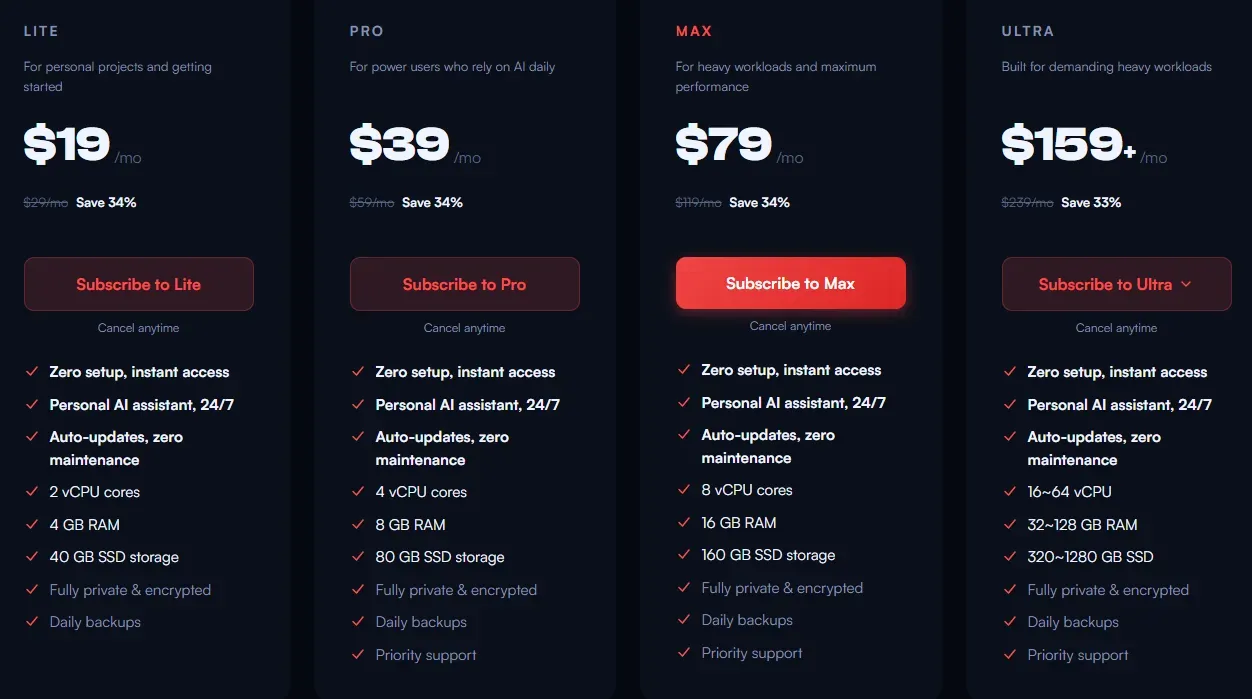
Note that MyClaw covers infrastructure only. You pay separately for your LLM API keys on top.
Token usage costs
The repeated input token costs are the real OpenClaw pricing, and community discussions consistently flag this as the biggest source of billing shock.
Every task runs about 3–8 LLM calls. Every call sends the full system prompt, tool definitions and instructions. OpenClaw stores conversation history in those markdown memory files, which means token usage grows as sessions lengthen. A few dozen messages in, you're carrying significant overhead on every request. OpenClaw also runs a background heartbeat process that requires repeated model decisions just to check for scheduled workflow triggers—even when you're not actively doing anything. If you're using premium models for all of this, the monthly AI spend compounds.
Lance Cleveland, who carefully tracked his API costs, found that the connection method alone (OAuth vs API key) significantly changed his monthly cost, and that token usage per week looked very different from what he'd estimated based on his prompt length. The variable input from the stored context, not the prompts themselves, drove most of the cost.
Here's what the numbers look like based on current user reports:
The OpenClaw Cloud plan at getopenclaw.ai ($59/month, first month $29.50) takes a different approach—it bundles both hosting and AI access into one, with smart model routing that sends routine tasks to cheaper AI models and lets you reserve premium models for complex reasoning. If you want a single bill with no separate API keys to manage, it's the simpler option. The tradeoff is less control over model selection and no ability to set hard spending limits per workflow. MyClaw gives you more infrastructure flexibility, but you also have to manage your own API spend on top.
One thing worth flagging: unused capacity doesn't roll over to the next billing cycle. If you're running lighter workflows, you may find yourself paying for headroom you're not touching.
The math: for a solo developer using OpenClaw for small business workflows with occasional web research and no extensive browser automation, the total monthly cost lands somewhere near a single Zapier Professional subscription (about $20-ish). For power users running browser automation sessions against multiple sites with debugging code and lead processing in the mix, it can reach five to ten times that.
OpenClaw review: What it does well
The autonomous agent capability works fine. AI agents can already analyze data, predict trends and automate workflows to some extent. OpenClaw monitors triggers, executes workflows and remembers context across sessions without being prompted each time. Forgotten test workflows that you set up and left running are something OpenClaw users discover on their API bill two weeks later, which, in a way, is a kind of testament to how persistent it is.
LLM flexibility is also nice. You can save money by using separate API keys for each provider, swapping between them and switching to cheaper models for low-stakes tasks while reserving premium models for anything that actually requires complex reasoning. The 50+ integrations (spanning everything from WhatsApp and iMessage to Spotify, smart home hubs and GitHub) mean there's a good chance your existing stack is already covered without building custom skills from scratch.
Privacy by default for self-hosted deployments means nothing leaves your machine unless you configure it to. For teams handling sensitive data, like proprietary research, client information or anything where you'd pay separately for an on-premise solution, the self-hosted option has genuine value.
OpenClaw reviews on where it falls short
Initial setup is a barrier for non-tech-savvy users. OpenClaw's own maintainer warned on the project's Discord: "If you can't understand how to run a command line, this is far too dangerous a project for you to use safely." Dependency management, permission configuration, environment variables, API keys for each service, storage growth as memory files accumulate... Non-technical users will struggle and probably shouldn't attempt it without a managed hosting layer like MyClaw handling the infrastructure side.
Those concerns became especially visible during the troubled 2026.4.29 release cycle, when gateway slowdowns, plugin dependency repair loops, and unstable integrations across Discord, Telegram, and WhatsApp caused widespread reliability issues. In a public postmortem, the maintainer admitted OpenClaw had entered an awkward middle state: too much functionality had been moved toward plugins, while the core still performed heavy dependency loading, repair checks, and staging work that users felt immediately. The team is now trying to make the framework “smaller, safer and more infrastructure-grade” by reducing bundled dependencies, tightening plugin boundaries, improving release hygiene, and shifting optional components to ClawHub.
The semi-autonomous claim is also significantly ahead of reality. Multi-step workflows require intervention more often than the demos suggest. You're changing how your effort looks, not eliminating it altogether.
And then there's the security situation. A critical CVE in early 2026 allowed attackers to hijack active deployment instances through token leakage. Analysis of ClawHub skills found malware rates around 10–17% in some sample sets, with plugins exfiltrating Discord histories and cloud tokens without user awareness. Even OpenClaw’s maintainers have recently pointed to broader supply-chain concerns in the npm ecosystem, warning about transitive dependencies, install-time behavior, and postinstall scripts as the project becomes more plugin-driven.
OpenClaw's flexibility is great, but complexity and security risks limit its suitability for casual users. If you self-host, the security configuration is entirely your problem. There are no monitoring tools built into the core framework to alert you when something in your skill stack has gone sideways.
OpenClaw vs alternatives: A quick comparison
OpenClaw's viral run spawned a category in weeks. The security incidents accelerated it. By mid-March 2026, there were over a dozen serious forks and rewrites, each trying to fix something the original got wrong.
- NanoClaw treats security as the baseline, not an add-on. Agents run inside isolated containers per chat group, so a rogue skill or a bad LLM output affects only the sandbox. The tradeoffs: Claude-only LLM support, minimal plugin ecosystem and separate payments for anything beyond basic integrations.
- Moltworker is Cloudflare's direct answer to the "I want an AI agent but not the attack surface" problem. It runs OpenClaw-compatible workloads serverlessly inside Cloudflare Workers—no installation, no local system access, no server specs to manage. You skip separate environments entirely. The boundary is the Cloudflare sandbox itself: no filesystem, no shell commands, no local network access.
- Nanobot comes from the Data Intelligence Lab at Hong Kong University (HKUDS) and is, depending on who you ask, either the most sensible take on the whole category or just a stripped-down research project. It supports local models via Ollama, connects to Telegram, WhatsApp, Discord and Feishu; no plugin marketplace, limited messaging platforms, not production-ready for enterprise. But for anyone who wants to scale gradually from a simple personal project to something more complex without inheriting 430,000 lines of TypeScript risk, it's a reasonable starting point.
- ZeroClaw is the performance-and-security rewrite. Rust binary, 3.4MB, sub-10ms cold starts, deny-by-default security settings and direct migration support from OpenClaw. Memory footprint is significantly smaller, which matters if you're running OpenClaw on shared VPS plans that are creaking under the original's resource consumption. For heavy automation setups where OpenClaw is eating RAM you're paying for, it's the practical switch.
From planning to product: AI assistant for building
OpenClaw handles the upstream work well—monitoring competitor pages, pulling data overnight, aggregating research and turning that research into a structured product requirements document. Set it up correctly, and it runs quietly, does its job, and hands you something useful.
The problem is what comes next. A PRD isn't a screen. Competitive UX research isn't a UI flow. The gap between "here's what we think we should build" and "here's something someone can actually use" is where tools like OpenClaw run out of road.
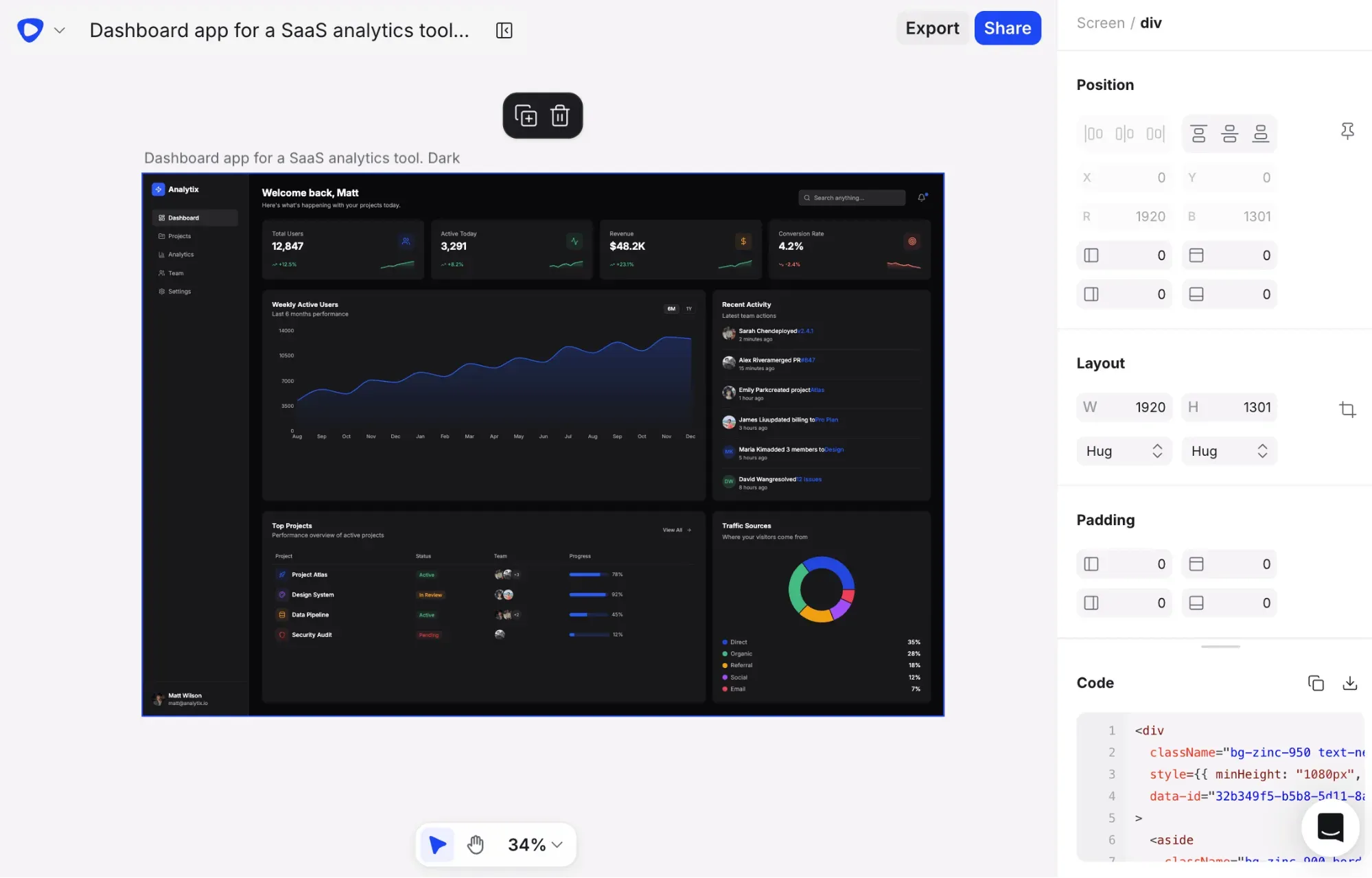
Flowstep is the bridge that moves your project forward. It's an AI UI design tool that takes structured inputs—a prompt, a brief, a PRD, a reference URL—and generates real, editable interface screens on an infinite canvas. Describe what you want or upload what OpenClaw helped produce, and get full-screen designs you can work with. Edit with AI or manually, generate multiple screens in a single pass, and copy anything straight to Figma with ⌘C and ⌘V—no export workflow.
For product managers who spend most of their time communicating requirements across teams, this is the piece that's been missing from the agent workflow. You're not choosing between prototyping tools and code outputs—you get both, without switching platforms. Real-time collaboration means PMs, designers and engineers work on the same canvas at once. When engineering is ready to move, Flowstep exports clean React, TypeScript and Tailwind CSS. Plus, you can easily connect with your agents and apps via MCP.
Pricing is a message count, not a token calculation. One message, one credit. Manual edits are free. The monthly plan (all features, unlimited collaborators, unlimited projects) is from $15 monthly. Try it free.
Conclusion: Is OpenClaw worth it?
For technical users with clearly scoped, repeatable workflows: yes. The zero-cost self-hosted option is solid. The performance, once configured properly, is legitimate. The Cloud plan is a fair trade if you'd otherwise lose days to server setup and usage monitoring. And if you want managed infrastructure without the AI included, MyClaw's plans give you a dedicated OpenClaw instance without becoming a sysadmin.
For everyone else, the bar is higher than the marketing suggests. Set hard spending limits on your API spend before you start. Review your ClawHub skills before you install them. Don't run it on production hardware connected to anything sensitive until you've read the security documentation carefully. And don't expect it to replace a human—expect it to change what a human needs to do.
If you're using OpenClaw to explore product ideas, the next step is turning those ideas into something visual. That's what Flowstep is for.
FAQs
Is OpenClaw free to use?
The software itself costs nothing; there is no paid-subscriber model. But running it requires server hosting (usually $20+/month for a dedicated server, or $29/month for a fully managed MyClaw instance) and LLM API costs that vary substantially by model and usage volume. OpenClaw's own Cloud plan at $59/month bundles both AI access and hosting into a flat rate, with the first month for $29.50.
Why is my OpenClaw API bill so high?
OpenClaw requires repeated model decisions in the background just to monitor triggers—even when no active task is running. Every call also carries the full conversation history and system prompt, so repeated input token costs compound as sessions grow. Switching to cheaper models for routine tasks and setting hard spending limits before you run any multi-step workflows reduces surprises.
What is the monthly cost for OpenClaw?
This genuinely depends on your setup. A local install with Ollama is near zero cost. A basic VPS with a budget model runs $10–$25/month. MyClaw managed hosting starts at $29/month (or $16/month billed annually) for the Lite plan—that's infrastructure only, your API costs still run on top. The OpenClaw Cloud plan at $59/month includes AI. Extensive browser automation with premium models and active lead processing workflows can reach $300–$750 per month regardless of hosting setup.
What can OpenClaw do that ChatGPT can't?
ChatGPT answers questions. OpenClaw runs things. It executes scheduled cron jobs, sends emails, monitors websites, runs browser automation sessions, manages your calendar and maintains persistent memory across sessions, all without you manually prompting it. It connects to 50+ services across chat apps, developer tools, smart home platforms and productivity apps, operating as an active, autonomous agent that works while you sleep, not an interface you query when you need something.
